Make a REDCap Report
REDCap Reports are powerful ways to view, filter, and analyze data across a REDCap project. To create a REDCap report, go to the Project Home page under the REDCap menu where a gray lefthand toolbar appears. In the Applications section, click the link to “Data Exports, Reports, and Stats.”
Go to the bottom of the new page, and click the button to “+ Create new Report.”

On the top yellow bar, name your report “Publication List” or something of that sort.
Scroll down to Step 2 and add for Field 2 the field “citation_full_citation.”

Scroll down to Step 3 and uncheck the checkbox to “Show data for all repeating instruments/events for each record returned.” Then under Step 3 for Filter 1, add “citation_include” for the field, “=” for the operator, and “Yes” for the value. This filter will then only show validated publications by the Publication Wrangler.
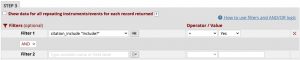
Then scroll to the bottom and click the blue button to “Save Report.” Then click the “View Report” button to view your report for all your scholars.
Export Your Report to a Spreadsheet
If you want to export your report to a spreadsheet, click the “Export Data” button on the top of your table of publication citations.

Scroll halfway down the page until you see a popup window titled “Exporting [Your Report’s Name].” Choose the export format to be “CSV / Microsoft Excel (labels).”
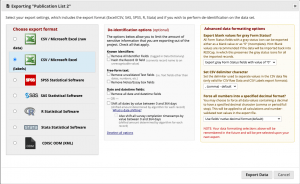
Then click the “Export Data” button in the lower-right, and a new popup window will occur. Click on the Excel CSV icon to download on the right. A CSV should download in your browser.
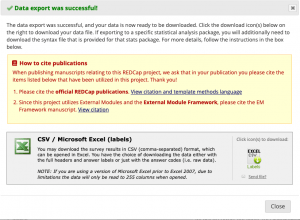
Note that there is currently no way in REDCap to get the scholar names to show up in the downloaded spreadsheet. This is a known limitation of REDCap that I’ve been unable to get their team to address so far.

Assistant Professor
- R01

Research Assistant Professor
- K25

- R01

Instructor
- K08
